CAD Guardian helps engineering and manufacturing teams automate CAD work, connect technical systems, and make critical delivery workflows easier to own.
Loading page
Engineering systems integration
Connect engineering decisions from CAD through ERP, documents, and reporting.
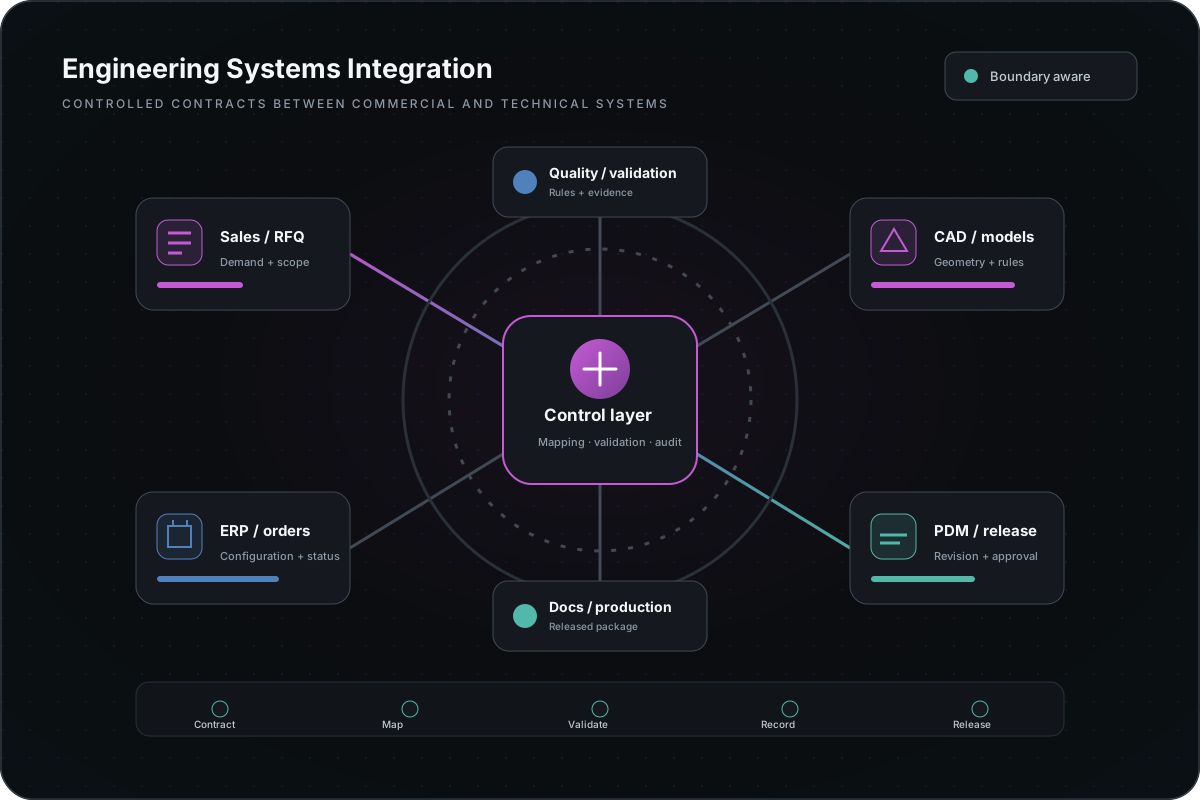
CAD Guardian connects CAD, PDM, PLM, ERP, estimating, APIs, documents, reporting, and internal applications so engineering data can move without repeated entry or hidden handoffs.
CAD, PDM/PLM, ERP, RFQ, document, API, and reporting platforms
Controls
Source of truth, state, identity, validation, and ownership
starting point
One record or artifact moving between two systems
Handoff
Contracts, logs, reconciliation, runbook, and support owner
Implementation model01 / 01
Implementation diagramEngineering systems integration map
The integration boundary follows the engineering decision and its owners across systems, records, and documents.
Operating problem
The same engineering fact exists in several systems with different owners.
Part numbers, project data, configuration choices, revisions, costs, documents, and approval states often diverge as they move between tools. Integration must make ownership and uncertainty visible rather than silently copy conflicting data.
Repeated re-entry between CAD, PDM, ERP, quoting, and reporting
Conflicting field values and unclear source-of-truth rules
File-based handoffs with limited status or auditability
Integrations that fail without usable logs or reconciliation
Automation that crosses a review or approval boundary without control
Service scope
Design the integration around records, decisions, and failure handling.
Source and target ownership
Field, file, API, event, and job contracts
Identity, permissions, environment, and deployment boundaries
Validation, reconciliation, retry, and exception behavior
User-visible status, logs, notifications, and audit evidence
Support ownership and rollback path
Deliverables
An integration boundary the business and technical teams can inspect.
Architecture
System, record, interface, and ownership map
Contracts
Payload, field, file, state, and error definitions
Validation
Reconciliation and exception evidence
Operations
Deployment, logging, support, and rollback runbook
Delivery process
Prove one handoff before building a broad integration program.
01 — Trace one record or artifact across the current systems.
02 — Assign source-of-truth and decision ownership.
03 — Define the interface, validation, and failure contract.
04 — Implement and reconcile a bounded production-shaped slice.
05 — Handoff monitoring, support, rollback, and expansion criteria.
Relevant implementation
Integration proof is tied to visible contracts and review boundaries.
The public case library shows generalized patterns across quote records, CAD output, workflow state, cloud job orchestration, data validation, documents, and reporting. Customer credentials, private endpoints, and proprietary payloads remain protected.
Start with one handoff whose failure is visible to the operating team.
CAD-to-PDM or PDM-to-ERP data handoff
RFQ, configuration, costing, and document workflow
Batch CAD job intake, status, output, and review
Engineering application APIs and data services
Reporting and audit visibility across technical systems
Related implementation stories
See how the approach changed real operating work.
Start with the business pressure and result, then open the technical appendix when your team needs implementation depth.
Engineering systems implementationManufacturing
Turn quoting into a governed path from RFQ intake to engineering handoff.
The problem was not simply replacing Excel. The useful rules and operator knowledge had to survive while request quality, configuration state, documents, status, and responsibility became easier to inspect.
Convert assembly state into classified BOMs, DXFs, labels, and release-ready packets.
Production preparation required the same assembly state to be interpreted separately for BOMs, flat patterns, DXFs, labels, lists, and package collection.