CAD Guardian helps engineering and manufacturing teams automate CAD work, connect technical systems, and make critical delivery workflows easier to own.
Loading page
Engineering data management
Make Vault lifecycle, metadata, jobs, and release work for the engineering team.
CAD Guardian helps engineering teams clarify and improve Autodesk Vault workflows across states, properties, permissions, job processing, release, migration, and connected CAD or business systems.
CAD files, drawings, documents, properties, BOM context, and revisions
Controls
Lifecycle, permissions, categories, numbering, jobs, and release
starting point
One document class, product family, lifecycle segment, or job
Handoff
State model, field ownership, validation set, and operating runbook
Implementation model01 / 01
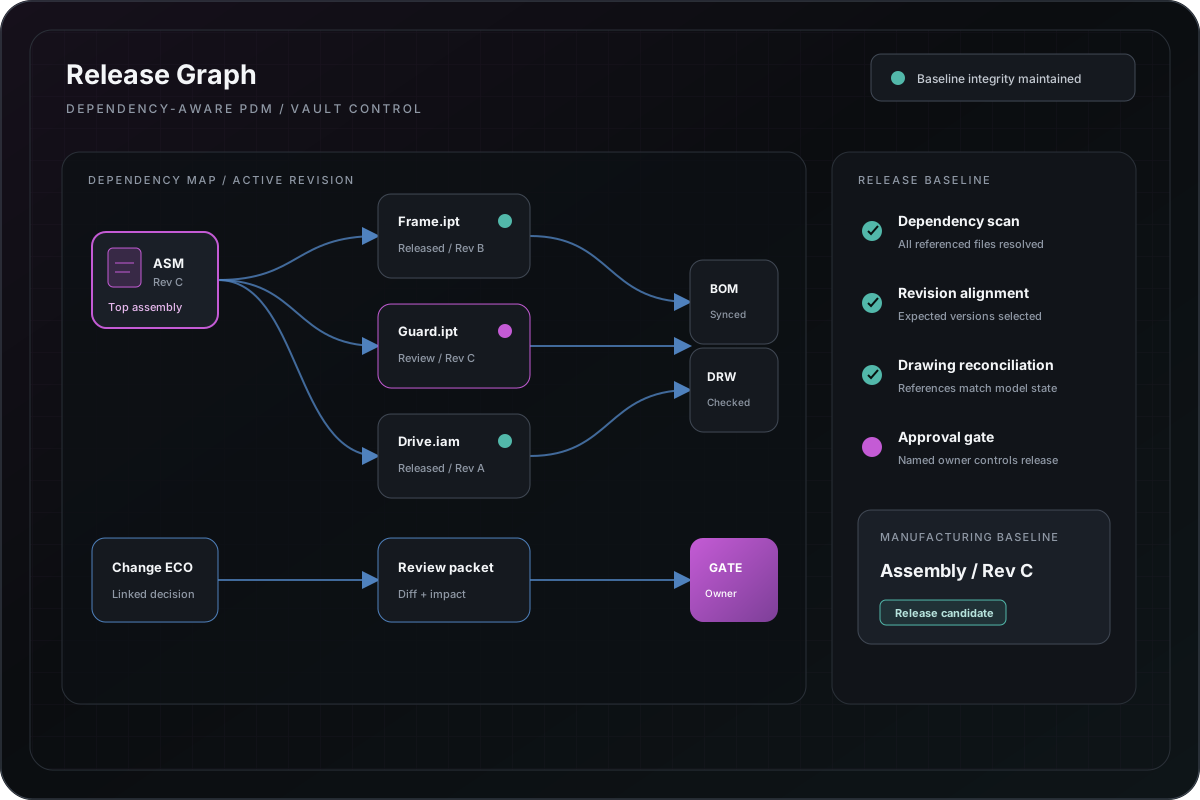
Implementation diagramVault and PDM release graph
Lifecycle automation is framed as an owned state-and-evidence system, not a hidden sequence of file operations.
Platform fit
Best when teams need control over engineering records and release behavior.
Vault work should start with the files, fields, transitions, responsibilities, and downstream decisions the platform must support—not with configuration changes in isolation.
Lifecycle, revision, approval, release, and change-control friction
Metadata ownership, category, numbering, and property-mapping problems
Job Processor reliability, queue visibility, retry, and support concerns
Migration, upgrade, integration, or adoption risk around engineering records
Capabilities
Configure and extend Vault around observable operating rules.
Lifecycle, category, property, numbering, permission, and release design
Vault API utilities, extensions, job handlers, processors, and diagnostics
Job Queue monitoring, retry, logging, support, and exception workflows
Migration inventory, field mapping, representative validation, and reconciliation
User workflow, administration, deployment, and handoff documentation
Integration
Vault becomes useful when record ownership survives system boundaries.
Inventor, AutoCAD, document, ERP, PLM, reporting, and workflow applications
Properties, BOM context, release status, project records, and generated outputs
APIs, SQL, files, event or job-driven processing, and controlled exports
Operational dashboards, exception queues, logs, and support notifications
Modernization
Modernize from operating model to extension code.
01 — Inventory records, lifecycle, metadata, jobs, integrations, and failure history.
03 — Pilot one document class, product family, job, or integration boundary.
04 — Reconcile output, permissions, states, logs, and exception handling.
05 — Release with support runbooks, rollback, and measurable adoption ownership.
Relevant implementation
Evidence must separate architecture from deployment-specific proof.
Public material can demonstrate job-queue architecture, workflow patterns, diagnostics, and validation strategy. Deployment-specific claims require controlled access to the target Vault environment.
Start with the business pressure and result, then open the technical appendix when your team needs implementation depth.
Engineering systems implementationManufacturing
Turn quoting into a governed path from RFQ intake to engineering handoff.
The problem was not simply replacing Excel. The useful rules and operator knowledge had to survive while request quality, configuration state, documents, status, and responsibility became easier to inspect.
Vault behavior depends on edition, release, configuration, permissions, and live data.
A public description cannot establish compatibility with a specific Vault deployment. Production work requires the exact release, server and client context, add-ins, lifecycle configuration, permissions, data shape, and representative records.
Migration and upgrade confidence requires representative production-shaped validation
Job Processor results depend on installed CAD applications, credentials, and runtime dependencies
Lifecycle automation does not replace accountable release and change ownership
Next step
Bring the Autodesk Vault workflow that needs to move faster and release reliably.
Name the current workflow, accepted output, platform version, dependencies, known failure cases, and the first decision the engagement should resolve.