AI-assisted engineering
CAD Model Fundamentals for Automation-Minded Teams
Gives non-specialists and automation teams a shared language for CAD models so requirements, review, and handoff do not get lost in translation.
Decision brief
Use this article as a routing artifact, not passive content.
Read time
5 min
Updated
May 30, 2026
Route
AI-assisted engineering
Why it matters
Gives non-specialists and automation teams a shared language for CAD models so requirements, review, and handoff do not get lost in translation. The useful signal is the operating judgment behind the topic: scope, data boundaries, proof, UAT, and handoff.
Best lens
Read it through Autodesk Inventor, Autodesk Vault, Autodesk API and decide which service, proof artifact, or leadership conversation it supports.
Next action
Turn add-ins, Vault data, drawing packages, content libraries, and release workflows into managed delivery.
Modernize CAD systemsContentsJump sections
Evaluation note
Gives non-specialists and automation teams a shared language for CAD models so requirements, review, and handoff do not get lost in translation. Use it as a practical routing note: what problem is being described, what infrastructure is required, what guardrails matter, and what proof a buyer or hiring manager should ask to see.
CAD Guardian field context
This article gives teams a common CAD vocabulary before they automate. That matters because software can only help when the humans agree on what a model, drawing, property, revision, and deliverable actually mean.
- Usefulness: connects drafting knowledge, software boundaries, and business review so automation improves output quality instead of hiding risk.
- Infrastructure: sample drawings, model intent, standards, fixture files, validation examples, senior drafter review, logs, and handoff notes.
- Guardrails: least-privilege access, private-data minimization, approved AI-use boundaries, test data, UAT, runtime proof, and written acceptance criteria.
- Who benefits: CAD drafters, API developers, CAD managers, manufacturing teams, AEC teams, and buyers funding automation work.
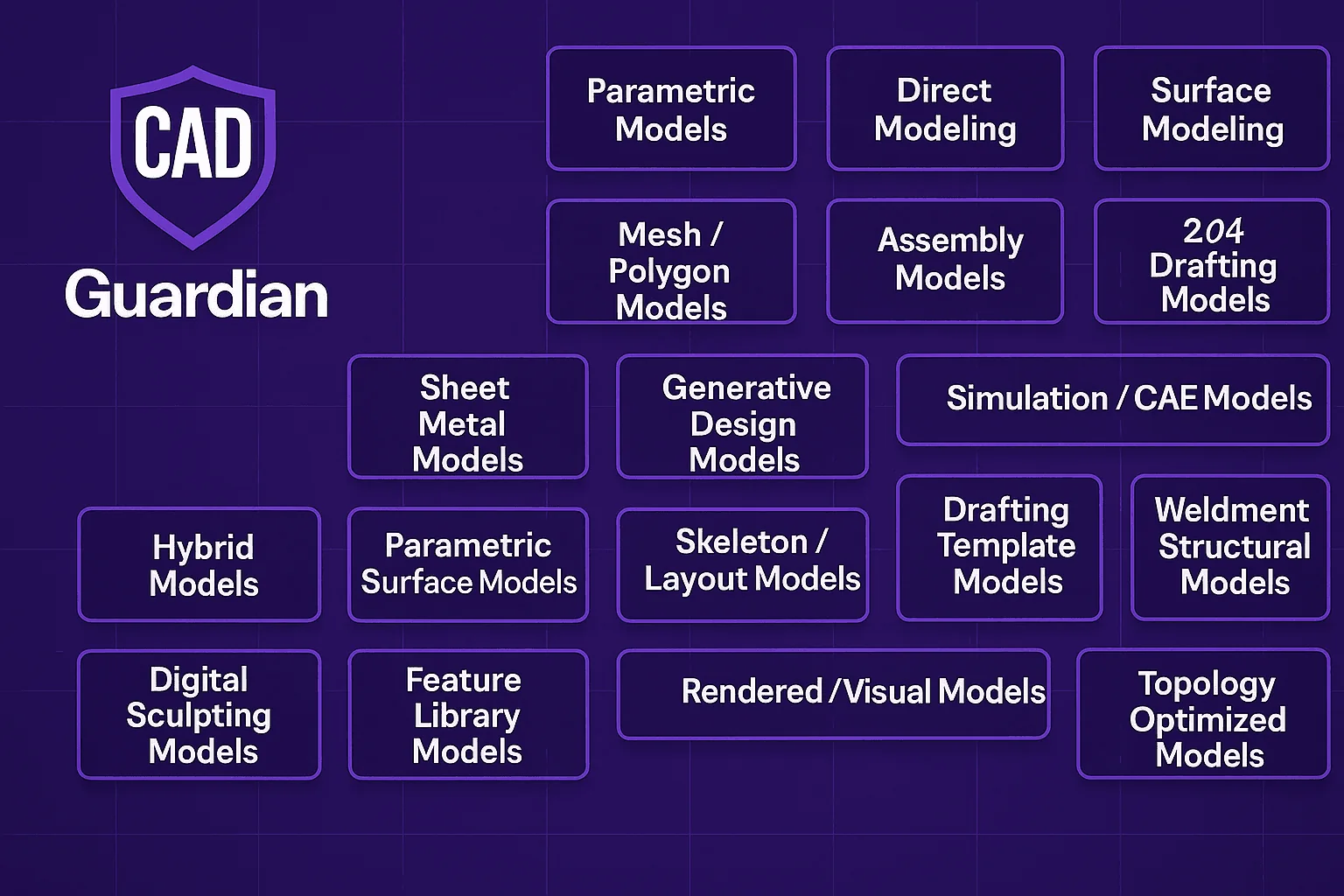
A simple, STEM-friendly guide for understanding every major type of CAD model used in engineering, design, and manufacturing.
Modern engineering depends on digital models. Every product you see—cars, phones, machines, sneakers, robots—starts as a CAD model. But “CAD” is not just one thing. There are multiple model types, each built for a different job.
This cheat sheet breaks them all down in plain language, so anyone can understand how professional engineering teams think and build.
1. Parametric Models
What it is: Models controlled by dimensions, constraints, and a feature history.
Why it matters: Easy to update—change one number and the whole model adjusts.
Used for: Brackets, housings, parts that get revised often.
2. Direct Models
What it is: Edit geometry without a feature tree using push/pull tools.
Why it matters: Fast for late-stage tweaks.
Used for: Quick design reviews and last-minute corrections.
3. Surface Models
What it is: Smooth, freeform shapes built from surfaces instead of solid blocks.
Why it matters: Allows complex curves and styled surfaces.
Used for: Car bodies, phone shells, bottle designs.
4. Solid Models
What it is: Fully closed, volume-based geometry.
Why it matters: Strong manufacturing reliability.
Used for: Shafts, gears, casings, mechanical parts.
5. Mesh / Polygon Models
What it is: Shapes built from triangles or polygons.
Why it matters: Great for digital graphics, not precision manufacturing.
Used for: 3D printing, animation, VR/AR assets.
6. Sheet Metal Models
What it is: Flat sheets that bend, fold, and cut. Includes flat-pattern generation.
Why it matters: Shows exactly how a metal part is formed before fabrication.
Used for: HVAC ducts, cabinets, brackets.
7. Assembly Models
What it is: Multiple parts combined into one digital machine.
Why it matters: Lets engineers test movement, fit, and clearances.
Used for: Robots, consumer electronics, machinery.
8. 2D Drafting Models
What it is: Classic engineering drawings with dimensions and notes.
Why it matters: Needed for CNC, machining, and fabrication.
Used for: Production drawings and shop-floor documents.
9. Generative Design Models
What it is: AI creates lightweight, optimized shapes based on performance rules.
Why it matters: Produces designs impossible for humans to imagine.
Used for: Aerospace brackets, bike frames, high-strength lightweight parts.
10. Simulation / CAE Models
What it is: Geometry prepared for FEA/CFD analysis.
Why it matters: Predicts stress, heat, flow, and failure before manufacturing.
Used for: Pressure vessels, chassis, engine parts.
11. Hybrid Models
What it is: A blend of solid modeling and surface modeling.
Why it matters: Flexibility—best of both worlds.
Used for: Mixers, consumer products, appliances.
12. Parametric Surface Models (NURBS)
What it is: Smooth surfaces driven by curves and mathematical rules.
Why it matters: Highest level of control for complex shapes.
Used for: Automotive interiors, aircraft skins, high-precision surfaces.
13. Multibody Models
What it is: Multiple solid bodies inside one file.
Why it matters: Useful for molds, castings, and parts with multiple interacting shapes.
Used for: Welded parts, forging dies, mold design.
14. Skeleton / Layout Models
What it is: Reference geometry that defines big machines or assemblies.
Why it matters: Provides a single source of truth for large designs.
Used for: Cranes, vehicles, large equipment.
15. Drafting Template Models
What it is: Predefined title blocks, borders, and drawing formats.
Why it matters: Enforces consistency across teams.
Used for: Enterprise engineering groups and PDM systems.
16. Weldment / Structural Models
What it is: Profiles, beams, and joints assembled like a construction set.
Why it matters: Fast creation of frames and structures.
Used for: Racks, structural frames, carts.
17. Digital Sculpting Models
What it is: Clay-like digital modeling for organic shapes.
Why it matters: Perfect for ergonomic or artistic forms.
Used for: Toy design, footwear, characters, handles.
18. Feature Library Models
What it is: Saved, reusable parametric shapes—holes, ribs, bosses.
Why it matters: Speeds up repetitive design tasks.
Used for: Standardizing product lines.
19. Rendered / Visual Models
What it is: Models with materials, textures, and lighting.
Why it matters: Converts engineering parts into marketing-ready visuals.
Used for: Product catalogs, ads, pitch decks.
20. Topology-Optimized Models
What it is: AI-driven geometry that removes unnecessary material.
Why it matters: Stronger, lighter, high-performance parts.
Used for: Aerospace brackets, automotive components.
How to Use This Cheat Sheet (Even as a Beginner)
If you’re learning CAD or STEM design, this guide helps you:
- Understand how different models solve different problems.
- Know which modeling style to choose before you start building.
- Communicate clearly with engineers, drafters, developers, and automation teams.
- See how AI and automation fit into modern manufacturing workflows.
This knowledge is the foundation for advanced automation, Inventor/Vault workflows, CAD APIs, and engineering systems inside CAD Guardian.
How to use this article
Use this as a working lens for CAD automation collaboration, drafting intent, workflow design, and reviewable outputs. If the problem is a software leadership evaluation, route it through TSmithCode proof. If the problem is a scoped automation, CAD platform, data, or delivery engagement, route it through CAD Guardian so the first phase has clear boundaries, acceptance evidence, and a handoff path.
Related reading