Article
May 2, 2026
Binary Communication: The Cognitive Load System for Elite Technical Professionals
Most professionals do not lose credibility because they lack intelligence. They lose credibility because they overload the reader. Binary Communication fixes that.
Most technical professionals do not struggle because they lack intelligence.
They struggle because their communication does not match the cognitive bandwidth of the person receiving it.
Engineers over-explain.
Developers add too much context.
Architects assume everyone wants the full system map.
Founders try to prove value in one message.
Job candidates answer simple questions like they are defending a dissertation.
The result is predictable:
The message may be technically correct, but the reader feels overloaded.
That is a communication failure.
At CAD Guardian, we think about systems, constraints, standards, and repeatable execution. The same thinking that applies to CAD automation, enterprise integrations, Autodesk governance, and engineering data workflows also applies to communication.
A message is a system.
It has an input, a processing cost, an output, and a failure mode.
The failure mode is cognitive overload.
So I started thinking about communication through a system that computers already understand:
Binary exponential sequencing.
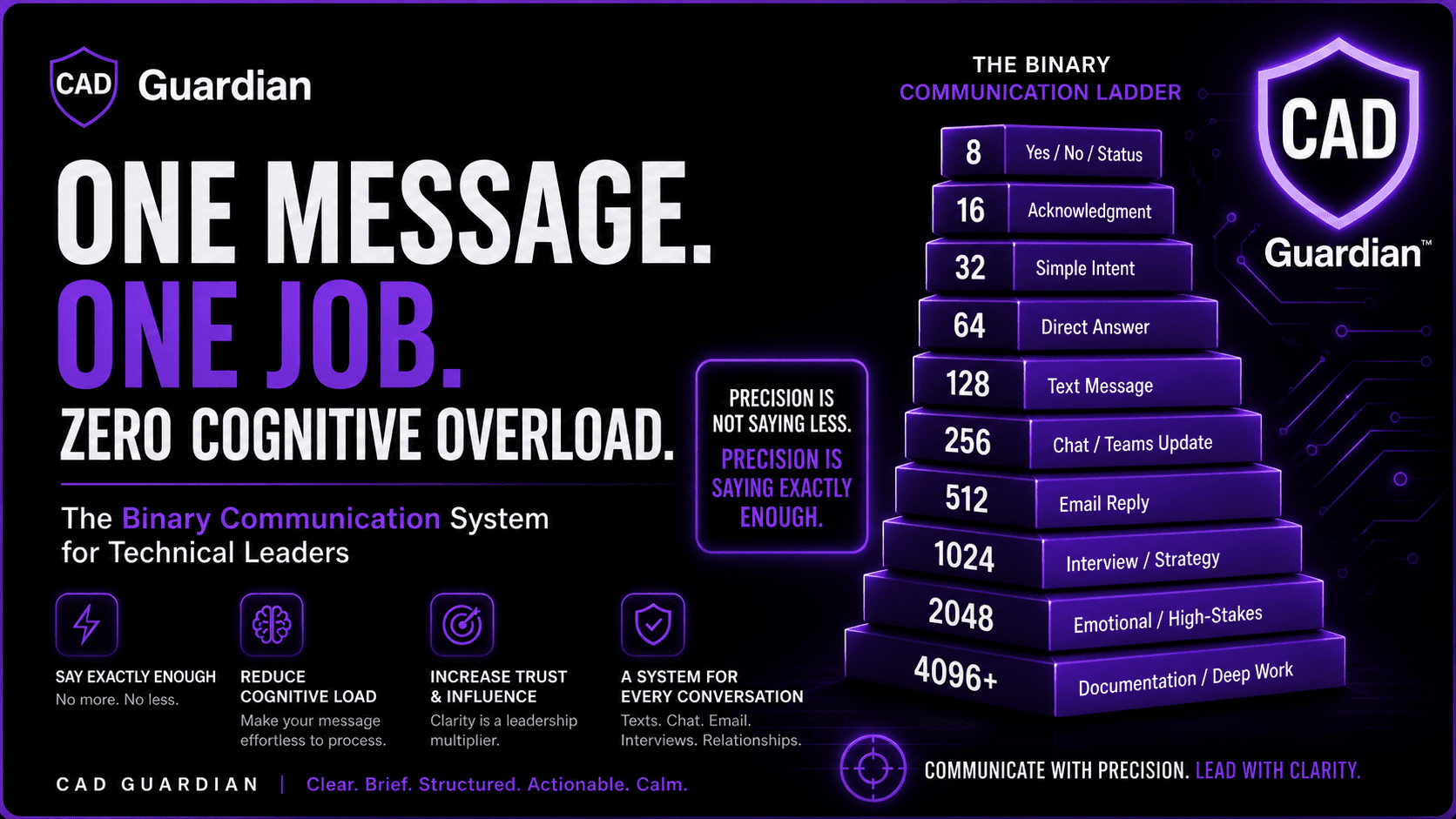
8 → 16 → 32 → 64 → 128 → 256 → 512 → 1024 → 2048
This simple sequence can become a personal communication protocol for texts, emails, interviews, Teams messages, executive updates, emotional conversations, spiritual reflection, and technical documentation.
The goal is not to become robotic.
The goal is to become clear, brief, structured, and impossible to misunderstand.
The Problem: Most Smart People Communicate Too Heavy
High-performing technical people often make one major mistake:
They communicate based on what they know, not what the other person can process.
That is how a simple message becomes a wall of text.
That is how a direct question becomes a long explanation.
That is how an interview answer becomes scattered.
That is how an email becomes a burden instead of a decision tool.
In professional environments, communication is not judged only by truth.
It is judged by:
how fast the reader understands it
how much effort it takes to process
how clearly it supports a decision
how calmly it handles pressure
how easy it is to respond to
A strong communicator does not just transfer information.
A strong communicator reduces friction.
The Binary Communication Ladder
Binary Communication uses powers of two as a writing constraint.
Each tier has a purpose.
Tier | Character Limit | Best Use |
8 | 8 characters | Yes, no, status |
16 | 16 characters | Acknowledgment |
32 | 32 characters | Simple intent |
64 | 64 characters | Direct answer |
128 | 128 characters | Text message |
256 | 256 characters | Chat / Teams update |
512 | 512 characters | Email reply |
1024 | 1,024 characters | Interview answer / strategic email |
2048 | 2,048 characters | Emotional, spiritual, or high-stakes clarity |
4096+ | 4,096+ characters | Documentation, SOPs, proposals |
The rule is simple:
Start lower. Scale only when the situation earns it.
Most messages should not begin at 1024 characters.
Most people do not need your entire context stack.
They need the point, the relevant context, the ask, and the next step.
The Core Rule: One Message, One Job
Every message should have one primary job.
Not five.
Not seven.
One.
Before sending anything, ask:
What is this message hired to do?
Is it hired to confirm?
Ask?
Clarify?
Negotiate?
Repair?
Document?
Persuade?
Escalate?
Close?
If the message has multiple jobs, split it.
A message that confirms receipt should not also negotiate scope.
A message that asks for clarification should not also explain your life story.
A message that repairs emotional damage should not also defend your entire position.
A message that updates an executive should not include every detail that led to the update.
This is where communication becomes elite.
You stop writing from anxiety.
You start writing from structure.
The 64-Character Standard
The 64-character tier is for direct answers.
Example:
Confirmed. I’ll review today and send notes after.
This tier is useful when the other person already has context.
It communicates:
receipt
ownership
timing
next action
No drama.
No over-explaining.
No unnecessary emotional load.
This is the first major shift.
Many people write 800 characters when 64 would have created more trust.
The 128-Character Standard
The 128-character tier is the ideal default for text messages.
Example:
Confirmed. I’ll review the files today, validate the issue, and send a concise update before the meeting.
This is short enough to read on a phone but complete enough to sound responsible.
It is the right size for:
personal logistics
basic professional replies
scheduling
quick reassurance
direct updates
For most day-to-day communication, 128 characters is enough.
That may feel uncomfortable at first.
That discomfort is the point.
Concise communication forces discipline.
The 256-Character Standard
The 256-character tier is ideal for Teams, Slack, and internal chat.
Example:
I confirmed the issue is tied to the build output, not the shared UI logic. Next step is validating the add-in path, packaged DLL references, and load behavior in the target environment.
This is the professional chat sweet spot.
It gives enough detail to move work forward without turning the chat into documentation.
Use 256 characters when you need to communicate:
status
blocker
next step
owner
decision needed
Internal chat should reduce ambiguity.
It should not become a journal.
The 512-Character Standard
The 512-character tier is the executive email default.
Example:
Viktor, meeting and notes received. I’ll prepare by reviewing the repo, architecture notes, required dependencies, and local build setup. Before our meeting, I’ll send a short checklist confirming what is complete, what is blocked, and what I need clarified so we can use the meeting time efficiently.
This message works because it does four things:
Confirms receipt
Shows ownership
Names the work
Sets a useful next step
It does not beg.
It does not ramble.
It does not posture.
It sounds like someone who can be trusted with responsibility.
That is the point.
The 1024-Character Standard
The 1024-character tier is for interviews, negotiation, strategic communication, and high-stakes professional positioning.
This is where many technical professionals fail.
They either say too little and undersell themselves, or they say too much and lose the listener.
For interviews, use a compressed structure:
Situation → Action → Result → Relevance
Example:
In my CAD automation work, the problem was that drawing search and reuse depended heavily on tribal knowledge. I built a .NET-based drawing intelligence tool that scans files, extracts drawing attributes, categorizes configurations, and gives users searchable access to reusable engineering data. The result was faster drawing lookup, better revision visibility, and a clearer path toward governed CAD data. That maps directly to this role because the core value is turning fragmented technical workflows into repeatable enterprise systems.
This answer is not just a story.
It is structured evidence.
That is what interviewers need.
They are not only listening for what you did.
They are listening for how you think.
The 2048-Character Standard
The 2048-character tier is for emotionally significant communication.
This includes:
apologies
relationship repair
spiritual clarity
family issues
major misunderstandings
personal accountability
serious leadership moments
This tier exists because some matters deserve depth.
Concise does not mean cold.
Brief does not mean shallow.
Elite communication adapts to the emotional weight of the moment.
For emotional communication, use this structure:
Acknowledge → Own → Clarify → Commit
Example:
I understand why that affected you. I do not want to dismiss it or explain it away. My intent was not to create distance, but I can see how my words came across that way. I should have been clearer and more careful. Going forward, I’ll slow down, ask better questions, and make sure I understand before responding.
This works because it does not overload the other person with defense.
It creates safety through clarity.
The Professional Communication Defaults
Here is the practical operating system.
Communication Type | Preferred Limit | Maximum Before Overload |
Text message | 64–128 | 256 |
Teams / Slack | 128–256 | 512 |
Quick email reply | 256–512 | 1024 |
Formal professional email | 2048 | |
Interview answer | 1536 | |
Recruiter message | 256–512 | 1024 |
LinkedIn DM | 128–256 | 512 |
Executive update | 256–512 | 1024 |
Emotional repair | 2048 | |
Technical documentation | 2048+ | No strict limit |
The standard is not “always be short.”
The standard is:
Use the smallest message that fully serves the purpose.
That is different.
That is precision.
The Executive Communication Pattern
For professional messages, use this four-part structure:
Point → Context → Ask → Next Step
Example:
The build issue appears isolated to the add-in load path. I confirmed the shared UI assembly is compiling, but the target environment is not resolving the packaged dependency consistently. I recommend validating the MS_ADDINPATH configuration and packaging output before expanding scope. I’ll send a short checklist with findings and next actions.
This is how senior professionals communicate.
Not with more words.
With better compression.
The Personal Communication Pattern
For personal communication, use:
Feeling → Meaning → Need → Next Step
Example:
I felt disconnected after that conversation. I do not think either of us intended harm, but I want to be careful not to let confusion build into distance. I’d like us to talk calmly and understand each other better before making assumptions.
This is direct without being aggressive.
It is emotionally honest without being chaotic.
That distinction matters.
The Spiritual Communication Pattern
For spiritual communication, use:
Truth → Discernment → Humility → Action
Example:
I believe this situation requires patience and discernment. I do not want to react from fear or pride. I want to slow down, pray, seek wisdom, and respond in a way that reflects discipline, truth, and obedience instead of emotion.
Spiritual communication does not need to be long to be deep.
It needs to be clear, grounded, and sincere.
Why This Matters for Technical Leaders
Technical professionals are often measured by output.
But at senior levels, communication becomes part of the output.
Your writing determines whether people trust your thinking.
Your emails determine whether executives see you as organized.
Your interview answers determine whether hiring managers see you as senior.
Your Teams messages determine whether coworkers see you as reliable.
Your personal communication determines whether people feel safe with your clarity.
Your spiritual communication determines whether your words carry discipline or noise.
At higher levels, communication is not soft skill decoration.
It is execution infrastructure.
The CAD Guardian Standard
At CAD Guardian, the standard is simple:
Clear. Brief. Structured. Actionable. Calm.
That is the professional identity.
Not loud.
Not scattered.
Not bloated.
Not performative.
Just precise.
The best communicators are not the people who say the most.
They are the people who create the least confusion.
Final Rule
Before sending any message, run the binary check:
Can this be 2048?
Can this be 1024?
Can this be 512?
Can this be 256?
Can this be 128?
Can this be 64?
Then send the smallest version that still preserves truth.
That is elite communication.
That is cognitive-load control.
That is how technical professionals become trusted operators, architects, founders, and leaders.
Precision is not saying less.
Precision is saying exactly enough.
Work With Thomas
To hire Thomas Divine Smith II for software engineering, CAD automation, Autodesk consulting, enterprise systems, or technical architecture work, visit:
www.tsmithcode.ai